Resource Nodes
Version 1.0.0. The listing, or pick it up in the shop and run it.
Resource Nodes
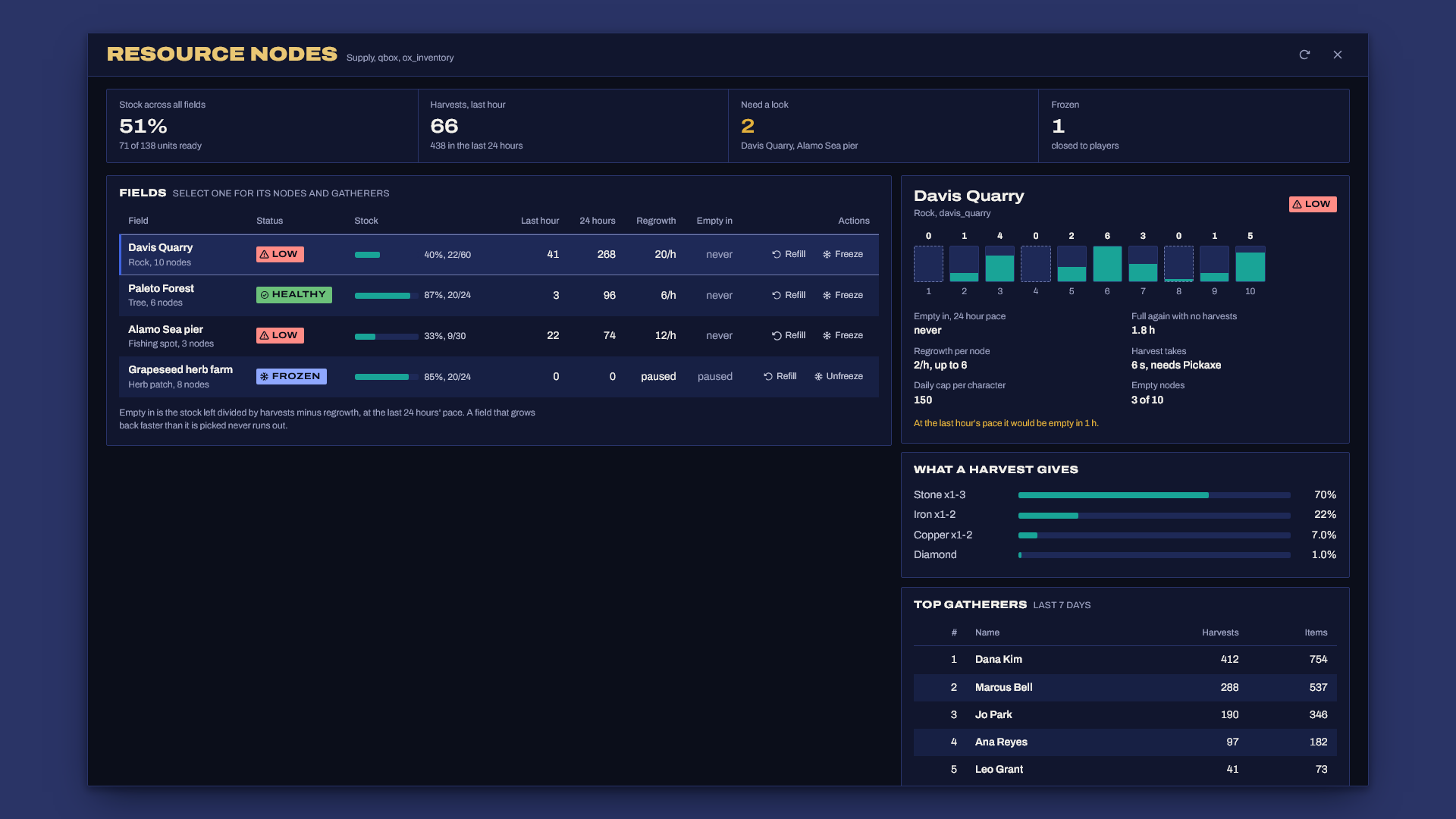
Resource Nodes gives every rock, tree, fishing spot and herb patch a stock that runs down when people harvest it and grows back over real time. Most gathering scripts hand out stone, wood and fish forever, so anyone can stand at a rock for an hour and flood the market, and gathered items end up worth nothing. Here supply is limited, so what players gather has a value, and staff can see where it's running out before it does.
What you get
- Node types you define: what a harvest gives (several items with weights and amounts), the tool needed, harvest time, how much a node holds and how fast it grows back, plus an optional prop and animation.
- Fields of nodes: list the spots by hand, or give a circle and a number and the nodes get placed for you, the same way every restart.
- Finite stock that persists. Each node keeps its stock in the database, so a restart never refills the map. Regrowth is worked out from timestamps when it's needed, so nothing ticks per node.
- Optional limits: a job list per field, and a daily cap per character per node type that survives reconnects and restarts.
- Players see the state: a marker that turns grey when a node is empty, a "Rock 3/5" label up close, and props that can change or disappear when a node runs dry.
- A supply screen (
/nodes) with every field's stock, harvests in the last hour and day, regrowth, a "days until empty at this rate" estimate, stock per node, what a harvest gives and the top gatherers. You can refill or freeze a field from there too. - Server-side everything: distance (from the server's own copy of the player's position), tool, stock, job, daily cap and inventory space are all checked on the server, the harvest timer runs on the server, and each player harvests one thing at a time.
- Exports for shops and other scripts: current supply per type, and a price multiplier that rises as supply falls.
- Framework support: ESX Legacy, Qbox and QBCore, with ox_inventory, qb-inventory, the ESX inventory, or an inventory that answers ox_inventory's exports.
Requirements
- ESX Legacy, Qbox or QBCore
- oxmysql
- OneSync (the server checks where players stand)
- ox_inventory, qb-inventory or the ESX inventory. An inventory that keeps its own item list and answers ox_inventory's
Itemsexport (for example ak47_qb_inventory) is checked against its own list. - ox_lib is optional. When it runs, prompts and notifications use it.
Install
- Unzip so that
resources/resource_nodes/fxmanifest.luaexists (notresources/resource_nodes-v1.0.0/resource_nodes/..., which Windows "Extract All" creates), then addensure resource_nodes. Start order doesn't matter for the framework, it waits up to 30 seconds for it and prints what it found. - Give staff the supply screen in
server.cfg:add_ace group.admin resourcenodes.admin allow - Add the items to your inventory (next section), or rename the items in
config.luato ones you already have. On start the server prints any item your inventory doesn't know. - Start the server. The tables create themselves (
sql/install.sqlis there if your database user can't create tables). - Go to Davis Quarry with a pickaxe and press E at a rock. Staff open the supply screen with
/nodes.
Items
Stock frameworks don't ship stone, logs, fish or the tools. The shipped config uses these names: pickaxe, hatchet, fishingrod, stone, iron, copper, diamond, wood_log, tree_bark, fish, fish_bass, fish_rare, herb_sage, herb_aloe. QBCore already has iron, copper and diamond.
ox_inventory, in ox_inventory/data/items.lua:
['pickaxe'] = { label = 'Pickaxe', weight = 1500, stack = false },
['stone'] = { label = 'Stone', weight = 500 },
['wood_log'] = { label = 'Wood log', weight = 1000 },
qb-inventory, in qb-core/shared/items.lua:
pickaxe = { name = 'pickaxe', label = 'Pickaxe', weight = 1500, type = 'item', image = 'pickaxe.png', unique = true, useable = false, shouldClose = false, description = 'For breaking rock' },
stone = { name = 'stone', label = 'Stone', weight = 500, type = 'item', image = 'stone.png', unique = false, useable = false, shouldClose = false, description = 'A chunk of rock' },
ESX inventory, in your database (INSERT IGNORE skips items you already have):
INSERT IGNORE INTO items (name, label, weight) VALUES ('pickaxe', 'Pickaxe', 2), ('stone', 'Stone', 1), ('wood_log', 'Wood log', 1);
Setting it up
Everything lives in config.lua, with a comment next to each setting.
Node types
stone = {
    label = 'Rock', verb = 'mine', tool = 'pickaxe', time = 6,
    stockMax = 6, regrowPerHour = 2, dailyCap = 150,
    yields = {
        { item = 'stone', weight = 70, min = 1, max = 3 },
        { item = 'iron', weight = 22, min = 1, max = 2 },
        { item = 'copper', weight = 7, min = 1, max = 2 },
        { item = 'diamond', weight = 1 },
    },
    prop = 'prop_rock_4_c',
    scenario = 'WORLD_HUMAN_CONST_DRILL',
},
- One harvest takes one unit of stock.
stockMaxis how many units a full node holds, andregrowPerHouris how many it gets back each real hour. - A harvest picks one
yieldsline by weight, then an amount frommintomax. Weights are relative, so 70, 22, 7 and 1 work out to 70%, 22%, 7% and 1%. toolis checked when the harvest starts and again when it ends, and it's never used up. Leave it out for no tool.dailyCapis harvests per character per day for this type. The day starts atConfig.DailyResetHour, server time.propis spawned at each node on the player's side only. AdddepletedPropto swap it when the node is empty (IE a stump for a tree), or leave it out to hide the prop.
Fields
{
    id = 'davis_quarry', label = 'Davis Quarry', type = 'stone',
    zone = { center = vector3(2950.0, 2790.0, 42.0), radius = 30.0, count = 10, seed = 7, spacing = 4.0 },
    job = { 'miner' },                                  -- optional
    blip = { sprite = 319, color = 5, scale = 0.7 },   -- optional
},
{
    id = 'alamo_pier', label = 'Alamo Sea pier', type = 'fish',
    coords = { vector3(1299.4, 4218.9, 33.9), vector3(1301.7, 4231.6, 33.9) },
},
- A
zoneplacescountnodes inside the circle, at leastspacingapart. The sameseedalways gives the same spots, and changing the radius, count or seed moves the nodes. - A zone only knows its center's height, so the server allows
Config.HeightSlackup or down. On steep ground, list thecoordsby hand instead. - Stock is saved under the field
idand the node's number. Don't rename a live field, or it starts full again.
Balancing supply
The rough math: a field of 10 nodes at 2 units an hour grows back 20 units an hour, about 480 a day. If your players harvest more than that, the field runs down, and the supply screen tells you in how many days. If it empties every evening, raise regrowPerHour or add nodes. If nobody ever finds an empty rock, lower them.
The supply screen
/nodes opens it for anyone with the ace above. Per field you see:
| Column | What it means |
|---|---|
| Status | Healthy, Draining (empty within 3 days), Low (under a quarter, or empty within a day), Empty or Frozen |
| Stock | Units ready now against the most the field can hold |
| Last hour, 24 hours | Harvests from the log |
| Regrowth | Units the whole field gets back per hour |
| Empty in | Stock left divided by harvests minus regrowth, at the last 24 hours' pace. "never" means it grows back as fast as it's picked |
Select a field for the stock of each node, how long until it's full with no harvests, what a harvest gives, and the top gatherers of the last Config.TopWindowDays days.
- Refill puts every node in the field back to full.
- Freeze closes the field. Nobody can harvest and nothing grows back until you unfreeze it, and harvests in progress stop and give their unit back. Freezing is saved, so it survives a restart.
Both buttons are checked against the ace on the server on every click. From the console or in game you can also type nodes refill <field id>, nodes freeze <field id> or nodes unfreeze <field id>. Typing nodes alone in the console prints every field's stock.
How a harvest works
- The player presses E at a node. The server checks the node exists, the field is open, the job, that the player stands next to it (using its own copy of their position, never what the client says) and that they carry the tool.
- It loads their daily count, rolls what the harvest will give and checks it fits in their inventory. Then it takes one unit from the node straight away, so two players can't both get the last one.
- The server runs the timer. Walking away, pressing X, switching character, disconnecting or a freeze stops it, and the unit goes back to the node.
- When the timer ends it checks the tool and the inventory space again and gives the item. If the inventory refuses it, the unit goes back to the node.
- The node's new stock, the player's daily count and a log line are saved.
Requests faster than a person can press a key get dropped, and each player can only run one harvest at a time.
Exports
local stock, max = exports.resource_nodes:GetSupply('stone')                -- units ready, units when full (nil for an unknown type)
local stock, max, frozen = exports.resource_nodes:GetFieldSupply('davis_quarry')
local mult = exports.resource_nodes:GetPriceMultiplier('stone')             -- see below
exports.resource_nodes:RefillField('davis_quarry')                          -- true when done
exports.resource_nodes:SetFieldFrozen('davis_quarry', true)
Prices that follow supply
GetPriceMultiplier slides from Config.Market.empty when every node of a type is empty to Config.Market.full when they're all full (1.6 and 0.9 by default). Nothing changes prices on its own, so use it wherever your shop or buyer sets a price:
local price = math.floor(12 * exports.resource_nodes:GetPriceMultiplier('stone'))
With Economy Pulse, multiply its live price, so inflation and scarcity both count:
local base = exports.economy_pulse:GetPrice('stone') or 12
local price = math.floor(base * exports.resource_nodes:GetPriceMultiplier('stone'))
Resource Nodes doesn't need Economy Pulse, and neither one needs the other to start.
Commands
| Command | Who | What |
|---|---|---|
/nodes |
ace resourcenodes.admin |
Supply screen |
/nodes refill|freeze|unfreeze <field id> |
ace resourcenodes.admin or console |
Refill, freeze or unfreeze a field |
nodes |
console | Every field's stock as text |
Troubleshooting
- Nothing happens and there's no
[resource_nodes]line in the console: the folder is most likely nested. Check thatresources/resource_nodes/fxmanifest.luaexists, and notresources/resource_nodes/resource_nodes/fxmanifest.lua. - "No framework finished starting within 30s": your framework isn't running or it has a different resource name. The line lists what it found. Set
Config.Frameworkif you run a renamed core. - "doesn't know these items": add those items to your inventory (see Items) or rename them in
config.lua. Case doesn't matter. - Every harvest says "Get closer first": OneSync is off (the console says so on start), or the node sits on a slope higher or lower than
Config.HeightSlackfrom the zone's center. List that field's coords by hand. - "Could not read saved stock, so nothing was started": the database answered with an error when loading stock. The resource stops so it doesn't refill every field. Fix the database connection and restart it.
- "Database setup failed": oxmysql isn't connected or your database user can't create tables. Run
sql/install.sqlby hand. - A prop doesn't show, only the marker: the model name isn't in the game files. The F8 console names it. Pick another model or remove
prop. - Stock looks the same for a minute after it should have grown: players get regrown stock every
Config.SyncSeconds(30 by default). Harvests and staff changes show straight away.
Escrow
The core is encrypted with Cfx asset escrow. These stay open so you can adapt them: config.lua, server/bridge.lua (all the framework and inventory code lives there) and sql/install.sql.
Support
Open a ticket in the Discord with your framework, inventory, oxmysql version and the server console output from startup.