Economy Pulse
Version 1.2.0. The listing, or pick it up in the shop and run it.
Economy Pulse
Economy Pulse logs every dollar that enters and leaves your server's economy, sorts it by where it came from, and gives staff one dashboard with the money supply, the inflation rate and which systems print money faster than anything burns it. Most servers find out their economy is broken when someone posts a screenshot of a $40 million bank account in general chat. This tells you weeks earlier.
Also runs needs vs wants pricing. Food, water and medical stay inside a tight band so a hot economy can't price a new player out of eating, and the luxury items (cars, phones, jewelry) absorb the inflation instead, which is where it belongs.
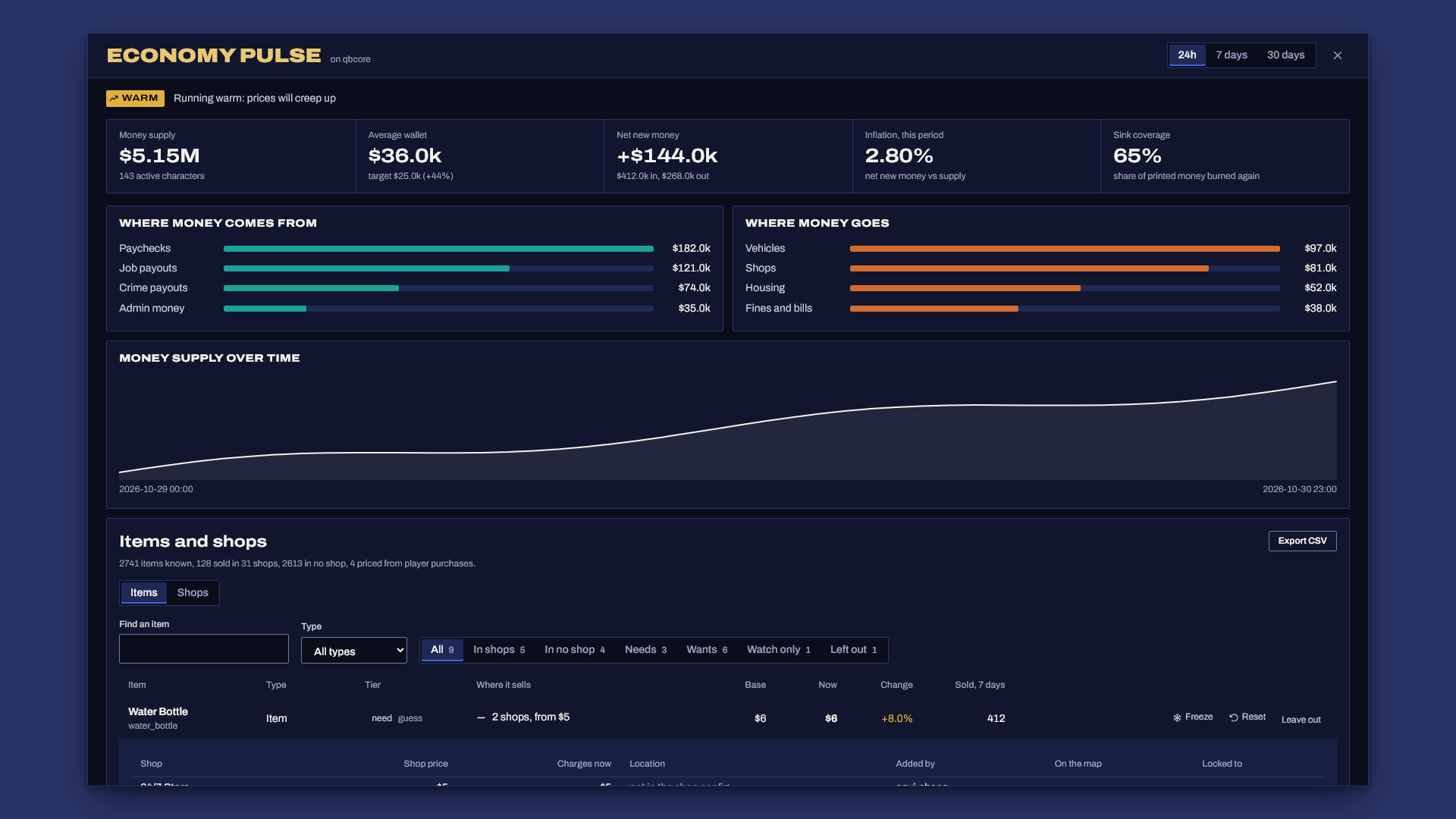
What you get
- A money ledger for every add and remove on cash and bank, grouped by reason (paychecks, job payouts, shops, fines, vehicles, housing, transfers). It's written in batches every few minutes, so even a full server costs a handful of queries an hour.
- Faucets vs sinks: where money comes from and where it goes, side by side, for 24 hours, 7 days or 30 days.
- Money supply tracking: hourly snapshots of total cash and bank across active characters (abandoned alts don't count), plus the average wallet against the target you set.
- A health verdict: printing money, running warm, balanced or deflating, based on how much of every printed dollar gets burned again.
- No item list to write. Every shop your inventory runs shows up with the price it already charges, and every purchase or sale to an NPC gets picked up as it happens.
- Live pricing that follows the money supply and each item's own sales, moves gradually and survives restarts. On ak47_qb_inventory the shops charge it directly. Staff can freeze, reset, switch need and want, or leave out any item from the dashboard.
- Framework support for ESX Legacy, Qbox and QBCore, detected automatically.
Requirements
- ESX Legacy, Qbox or QBCore
- oxmysql
- MySQL 5.7+ or MariaDB 10.2+
Install
- Unzip so that
resources/economy_pulse/fxmanifest.luaexists (notresources/economy_pulse-v1.0.1/economy_pulse/..., which Windows "Extract All" creates), then addensure economy_pulse. Start order doesn't matter: it waits up to 30 seconds for your framework and prints what it found. - Give staff access in
server.cfg:add_ace group.admin economypulse.admin allow - Start the server. The tables create themselves (
sql/install.sqlis there if your database user can't create tables). - Open the dashboard with
/econin game. Typeeconin the server console for a one-line summary.
Give it a day before you read anything into the numbers. The ledger needs real traffic, and the supply chart needs at least two hourly snapshots.
Make the categories match your server
Everything hinges on the reason text your scripts pass when they add or remove money (Player.Functions.AddMoney('bank', 500, 'paycheck'), xPlayer.addAccountMoney('bank', 500, 'Paycheck')). Config.Categories matches that text top to bottom, and the first match wins.
After a day, check Other in and Other out on the dashboard. Whatever lands there is a script with a reason you haven't mapped yet (or no reason at all, which is a problem with that script). Add its reason text to the right category and it sorts correctly from then on.
Money that moves outside the framework, for example a casino with its own chips or a custom bank, you record yourself:
exports.economy_pulse:Record(2500, 'add', 'casino payout')
How items are found
Nothing to configure. On start, Economy Pulse reads your inventory and picks up:
- Every item the inventory defines, sold anywhere or not: items, weapons, attachments and ammo (on ak47_qb_inventory its items, weapons, components and ammo lists; on ox_inventory its item list; otherwise QBCore's shared items or ESX's
itemstable). - Every shop and its price. On ak47_qb_inventory that is
shared/shops.luaplus every shop another script opens through it (qb-inventory and ox_inventory style shop exports both end up there). - Every purchase and NPC sale it can see. A player losing money and gaining one kind of item a moment later is a purchase, and gaining money while losing an item is a sale. Shops that bypass the inventory's own shops (business tablets, pawn shops, drug sales) show up this way, with what players really pay. Anything ambiguous, IE two items for one payment or a trade between players, gets skipped instead of guessed at. An item no shop lists gets a learned base price after 3 purchases.
- Which items are needs. Your server's food and drink (qb-smallresources consumables, ox_inventory item status) and medical items start as needs, and everything else starts as a want. Click the tier on the dashboard to switch it.
Mapping out shops
The Items and shops card lists every item, best sellers first, a hundred at a time, with a search, a type filter and these views (each one shows its count):
| View | What's in it |
|---|---|
| In shops | Items at least one shop sells |
| In no shop | Items nothing sells: where a new shop or vendor could go |
| Needs, Wants | By tier |
| Watch only | Priced items whose shop Economy Pulse can't reprice: you see the live price, the shop keeps its own |
| Left out | Items staff took out of pricing |
Open an item's Where it sells cell to see every shop that stocks it: the shop's own price, what it charges right now, its location (x y z of each spot in the shop config), the script that added it, whether it has a map blip, and the job or gang it's locked to. For items no shop sells, it shows what players have been seen paying elsewhere and what NPCs pay for them.
The Shops view flips it around: every shop with its item count, location, who added it and its full stock.
Export CSV (or econ export in the server console) writes two spreadsheets into the resource folder: export-items.csv with one row per item and every shop that sells it, and export-shops.csv with one row per shop and item, ready to sort or pivot.
ak47_qb_inventory
ak47 has no shop hooks, so Economy Pulse writes one small file into it on first start: ak47_qb_inventory/framework/server/economy_pulse.lua. ak47's manifest already loads that folder, so no ak47 file gets edited. Restart the server once after the first start so ak47 loads it, and the console says shop adapter connected when it's in. If an ak47 update wipes the file, that's fine, it comes back on the next start. To install it yourself instead, set Config.Discovery.InstallAk47Adapter = false and copy adapters/ak47_qb_inventory.lua there.
Each shop then charges its own price times the item's live multiplier, so two shops selling water at different prices both move by the same percentage. Stop Economy Pulse and every shop goes back to its own price. Config.Discovery.ApplyToShops = false keeps all shops at their own prices and only watches.
ox_inventory
Purchases are read from ox_inventory's buyItem hook, along with the shop price it carries. ox_inventory shops can't be repriced from outside, so their items are watch only unless the shop script asks for the price itself (below).
Your own shop scripts
A shop script that builds its own menu can ask for the live price and report what sold:
-- when building the shop menu: your own price of 8, adjusted
local price = exports.economy_pulse:GetPrice('bread', 8) or 8

-- after a successful purchase
exports.economy_pulse:RecordSale('bread', amount, totalPaid)
GetPrice returns nil for an item that is left out, so your shop keeps its own price. To pin an item's base price or tier, list it in Config.Items.
Tuning
| Setting | What it does | Start with |
|---|---|---|
TargetMoneyPerPlayer |
The average wallet you consider healthy. Prices sit at base when reality matches it. | Leave 25000 for a week, then set it to your real normal |
Sensitivity |
How hard prices follow the money supply | 0.5 (twice the money, about 1.4x prices) |
DemandWeight |
How much an item's own sales move its price | 0.3 |
Smoothing |
How far prices move per update | 0.2 (no overnight jumps) |
Tiers.need |
The band needs can move in | +10% / -15% |
Tiers.want |
The band wants can move in | +60% / -25% |
ActiveDays |
Which characters count toward the money supply | 14 |
If the dashboard says printing money, your economy is cooked and pricing alone won't save it. Pricing keeps inflation fair across needs and wants. To stop it, look at the biggest faucet and either pay it less or give players something worth spending on (that's what sinks are).
Escrow
The core is encrypted with Cfx asset escrow. These stay open so you can adapt them: config.lua, server/bridge.lua (all framework and inventory code lives there, edit it if your core is forked), sql/install.sql and adapters/ (the file copied into your inventory, so you can read exactly what runs there).
Support
Open a ticket in the Discord with your framework, your oxmysql version and the server console output from startup.