Craft and Progression
Version 1.0.1. The listing, or pick it up in the shop and run it.
Craft and Progression
Craft and Progression gives you crafting stations, recipes and skills with XP curves you can tune, plus a balancing screen that tells you in real hours how long each level takes before you ship it. Most crafting scripts give you a recipe list and a level number, then leave you to guess how long anything takes, and a month later you find out nobody passed level 5, or that one player maxed out in a weekend.
What you get
- Crafting stations anywhere on the map, each offering the recipe groups you pick, optionally limited to certain jobs, with an optional map blip.
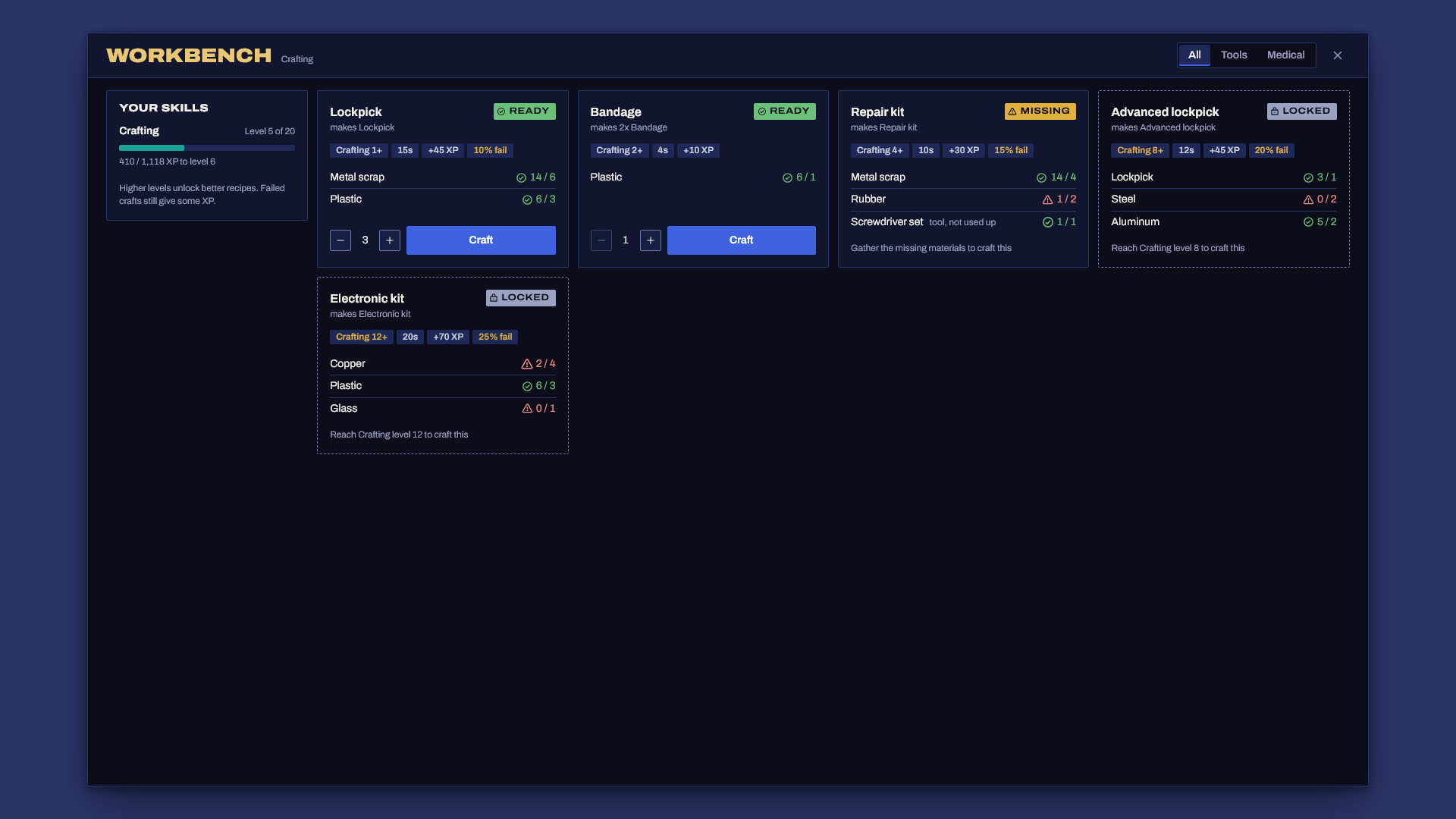
- Recipes with inputs, outputs, craft time, a required skill level and XP. Also an optional failure chance that only costs part of the inputs, and tool inputs that are needed but never used up.
- Skills with real curves: linear, power or exponential, each with its own parameters and max level.
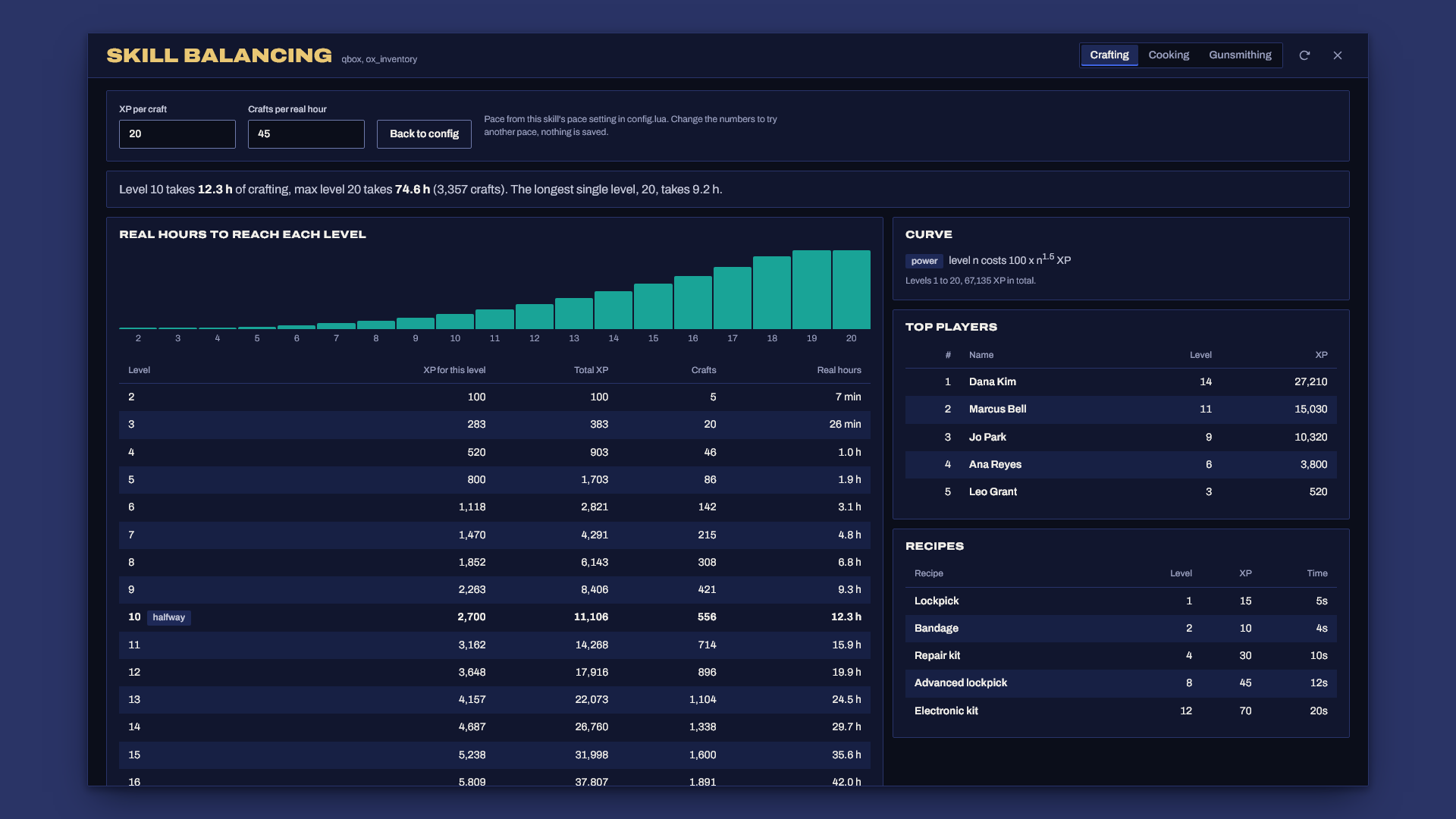
- A balancing screen (
/craftadmin) that shows, per skill, the XP for every level, the running total, the number of crafts and the real hours to get there at your expected pace. Change the pace on screen to try other numbers. A leaderboard of top players sits right next to it. - A crafting menu that shows every recipe at the station, the locked ones with the level they need, and what you carry against what each recipe needs.
- Server-side everything: distance to the station, job, skill level and items are checked on the server, the craft timer runs on the server, and a player can only craft one thing at a time.
- Exports so jobs, quests and other scripts can read levels and grant XP.
- Framework support: ESX Legacy, Qbox and QBCore, with ox_inventory, qb-inventory or the ESX inventory.
Requirements
- ESX Legacy, Qbox or QBCore
- oxmysql
- OneSync (the server checks how far players stand from the station)
- ox_inventory, qb-inventory or the ESX inventory. An inventory that keeps its own item list and answers ox_inventory's
Itemsexport (for example ak47_qb_inventory) is checked against its own list. - ox_lib is optional. When it runs, prompts and notifications use it.
Install
- Unzip so that
resources/craft_progression/fxmanifest.luaexists (notresources/craft_progression-v1.0.0/craft_progression/..., which Windows "Extract All" creates), then addensure craft_progression. Start order doesn't matter for the framework, it waits up to 30 seconds for it and prints what it found. - Give staff the balancing screen in
server.cfg:add_ace group.admin craftprogression.admin allow - Check that the item names in
Config.Recipesexist in your inventory. They ship with the QBCore defaults, and on start the server prints any item your inventory doesn't know. - Start the server. The table creates itself (
sql/install.sqlis there if your database user can't create tables). - Walk up to a station and press E. Staff open the balancing screen with
/craftadmin.
Setting it up
Everything lives in config.lua, with a comment next to each setting.
Skills and curves
crafting = {
    label = 'Crafting',
    maxLevel = 20,
    curve = { type = 'power', base = 100, exponent = 1.5 },
    pace = { xpPerCraft = 20, craftsPerHour = 45 },
},
Every skill starts at level 1. The curve sets the XP each level costs, where n is the level being bought minus one:
| Curve | Cost of a level | Feels like |
|---|---|---|
linear (base, step) |
base + step x (n - 1) | Steady, every level a bit longer than the last |
power (base, exponent) |
base x n ^ exponent | Quick early levels, a long tail at the top |
exponential (base, growth) |
base x growth ^ (n - 1) | Each level costs growth times the last, gets steep fast |
pace is how you expect people to play: XP per craft and crafts per real hour. The balancing screen turns that into hours. Leave it out and it gets worked out from the skill's recipes (average XP and craft time, plus Config.PaceOverhead seconds between crafts for walking and menus).
With the shipped Crafting skill at 20 XP per craft and 45 crafts an hour, level 10 takes about 12 hours of crafting and level 20 about 75 hours. If that's too slow or too fast for your server, change the curve and look again.
Recipes
repairkit = {
    label = 'Repair kit', group = 'tools', skill = 'crafting', level = 4, xp = 30, time = 10,
    inputs = { { item = 'metalscrap', qty = 4 }, { item = 'rubber', qty = 2 }, { item = 'screwdriverset', qty = 1, keep = true } },
    outputs = { { item = 'repairkit', qty = 1 } },
    failChance = 0.15, failLoss = 0.5,
},
groupdecides which stations offer it.keep = truemarks a tool. The player needs it, but it's never used up.failChanceis the chance a craft fails. A failed craft makes nothing and losesfailLossof each input, rounded down (0.5 by default), and still givesConfig.FailXpShareof the XP.- Players can queue up to
Config.MaxBatchat once. Time, inputs, outputs and XP scale with the amount, and each craft in the batch rolls on its own.
Stations
{
    id = 'ammunation_bench', label = 'Gunsmith bench',
    coords = vector3(15.91, -1106.84, 29.80),
    groups = { 'weapons', 'tools' },
    job = { 'police', 'ammunation' },          -- optional
    blip = { sprite = 566, color = 47, scale = 0.7 },   -- optional
},
Balancing before you ship
- In game:
/craftadmin(needs the ace above). Pick a skill, read the hours, and change XP per craft or crafts per hour to try another pace. Nothing on that screen is saved, so editconfig.luaonce you're happy. - In the server console:
craftbalance craftingprints the same table, which is handy before anyone has joined. - On start the server checks the config and prints anything that doesn't add up, IE a recipe needing a level above the skill's max, or a recipe group no station offers.
How crafting works
- The player opens a station. The server checks they're close enough and have the job, if the station needs one.
- They pick a recipe and an amount. The server checks the level and the inputs, locks the player so they can't start a second craft, and starts its own timer. The client only shows a progress bar.
- Walking away, pressing X, switching character or disconnecting cancels the craft. Nothing is taken until the end.
- When the timer ends the server checks the inputs again, takes them, makes sure the outputs fit and gives them. If the outputs don't fit, or the inventory refuses one, the inputs come back and no XP is given.
Exports
exports.craft_progression:GetLevel(source, 'crafting')               -- level, or nil
exports.craft_progression:GetXP(source, 'crafting')                  -- total XP, or nil
exports.craft_progression:AddXP(source, 'crafting', 50, 'delivered parts')   -- true, new level
nilmeans the player has no character loaded or the skill doesn't exist. In the first moment after a character loads, before their XP has come back from the database,GetLevelreads as 1 andGetXPas 0.AddXPonly takes positive whole numbers. A string,nil, NaN, zero or a negative returnsfalseand changes nothing. One call grants at mostConfig.MaxXpPerCall, and XP stops at the max level. XP granted while a character is still loading is kept and added once it loads.- Set
Config.Debug = trueto print everyAddXPcall with the calling resource and the reason.
Commands
| Command | Who | What |
|---|---|---|
/craftadmin |
ace craftprogression.admin |
Balancing screen and leaderboard |
/craftxp <id> <skill> <amount> |
ace craftprogression.admin or console |
Give XP, negative amounts take it away |
craftbalance <skill> |
console | The balancing table as text |
Troubleshooting
- Nothing happens and there's no
[craft_progression]line in the console: the folder is most likely nested. Check thatresources/craft_progression/fxmanifest.luaexists, and notresources/craft_progression/craft_progression/fxmanifest.lua. - "No framework finished starting within 30s": your framework isn't running or it has a different resource name. The line lists what it found. Set
Config.Frameworkif you run a renamed core. - "doesn't know these items": rename those items in
Config.Recipesto ones your inventory has, or add them to your inventory. The line names the item list it checked. Case doesn't matter, soWEAPON_PISTOLandweapon_pistolcount as the same item. - Every craft says "Get closer to the station": OneSync is off. The console says so on start.
- "Database setup failed": oxmysql isn't connected or your database user can't create tables. Run
sql/install.sqlby hand. - The menu opens but a recipe shows "Missing materials" while you have the items: the recipe asks for an item name your inventory spells differently.
Escrow
The core is encrypted with Cfx asset escrow. These stay open so you can adapt them: config.lua, server/bridge.lua (all the framework and inventory code lives there) and sql/install.sql.
Support
Open a ticket in the Discord with your framework, inventory, oxmysql version and the server console output from startup.