Player Insights
Version 1.0.0. The listing, or pick it up in the shop and run it.
Player Insights
Player Insights answers the question every server owner keeps asking: are new players sticking, and when do they leave? You spend money on ads, a new map or a big event, and a week later you still can't tell whether it worked. This tells you.
It records when each player joins and leaves, then turns that into the numbers a game studio would look at. That means new and returning players per day, how many come back after a day, a week and a month, how long sessions last, when your server is busiest, which regulars have stopped coming and why people disconnect. Staff read all of it on an in-game dashboard.
It runs with no framework at all. If ESX, Qbox or QBCore is running, the at-risk list also shows character names.
What you get
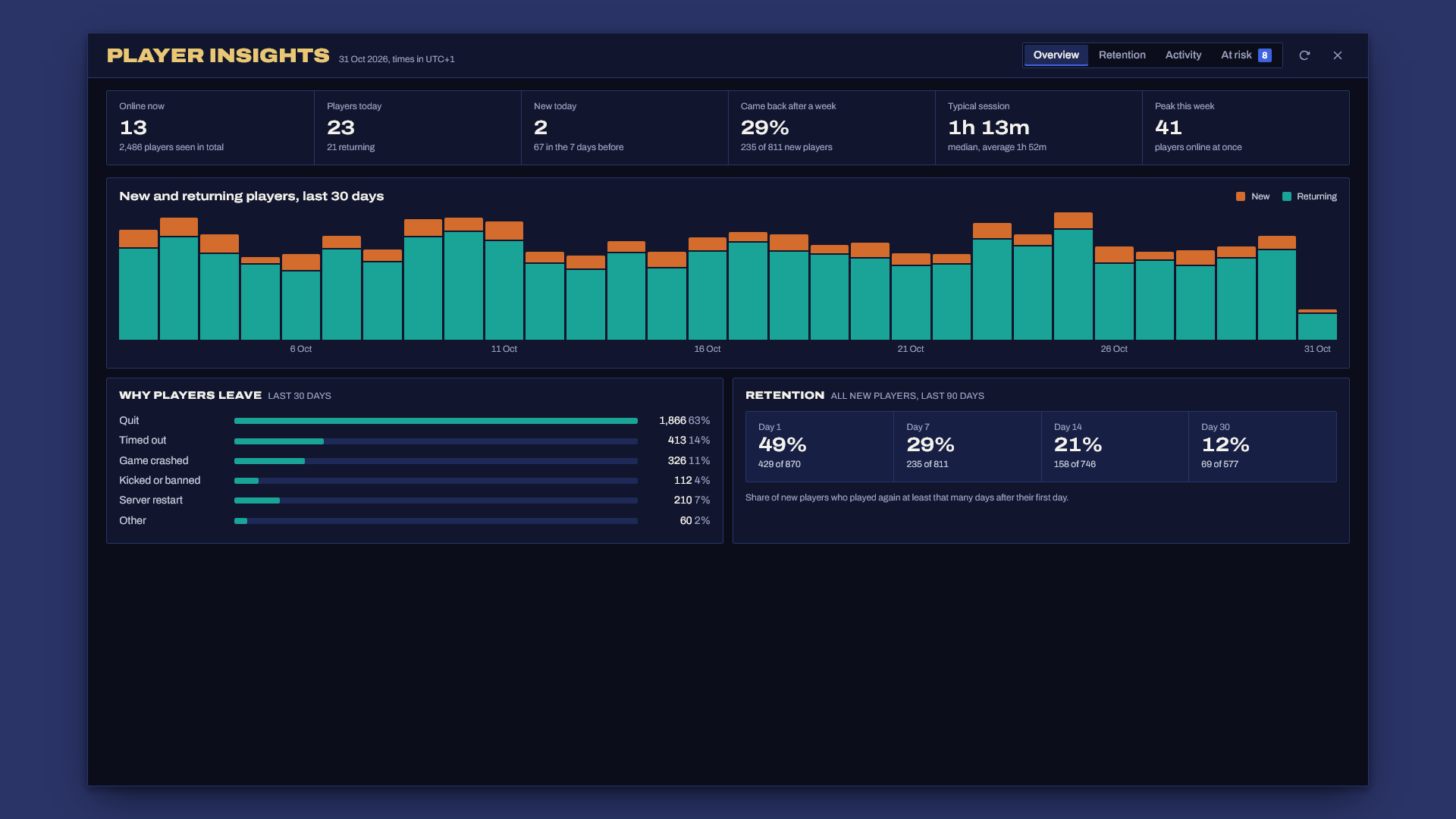
- New and returning players per day for the last 30 days, with today's numbers live.
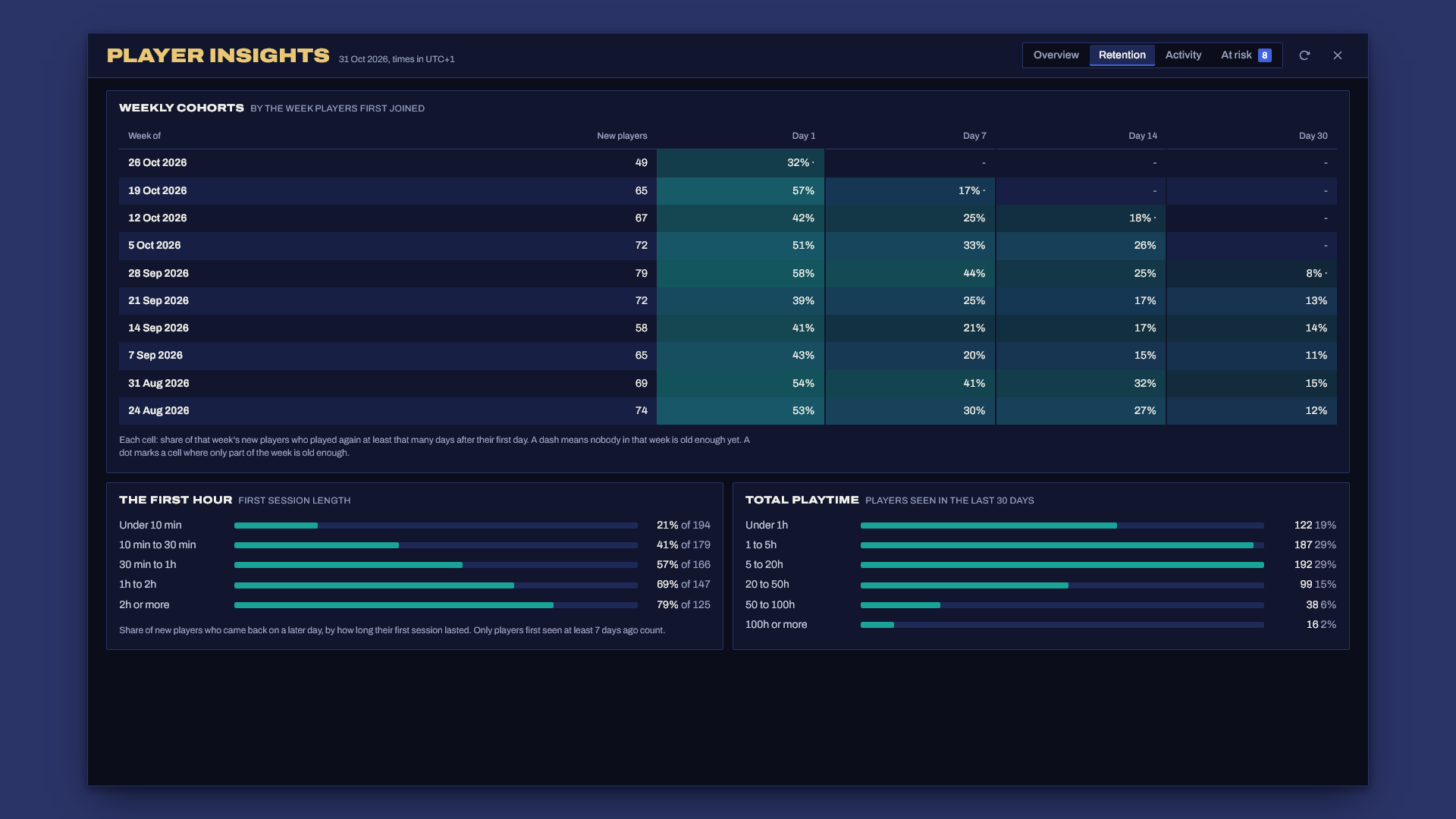
- Retention by weekly cohort. Each row is the week players first joined, and each column is the share of them who played again at least 1, 7, 14 or 30 days after their first day. It's the same cohort table any app analytics tool uses.
- The first hour signal. How long a new player's first session lasted, against whether they ever came back. If players who leave inside 10 minutes almost never return, your spawn, tutorial or whitelist wait is where you're losing them.
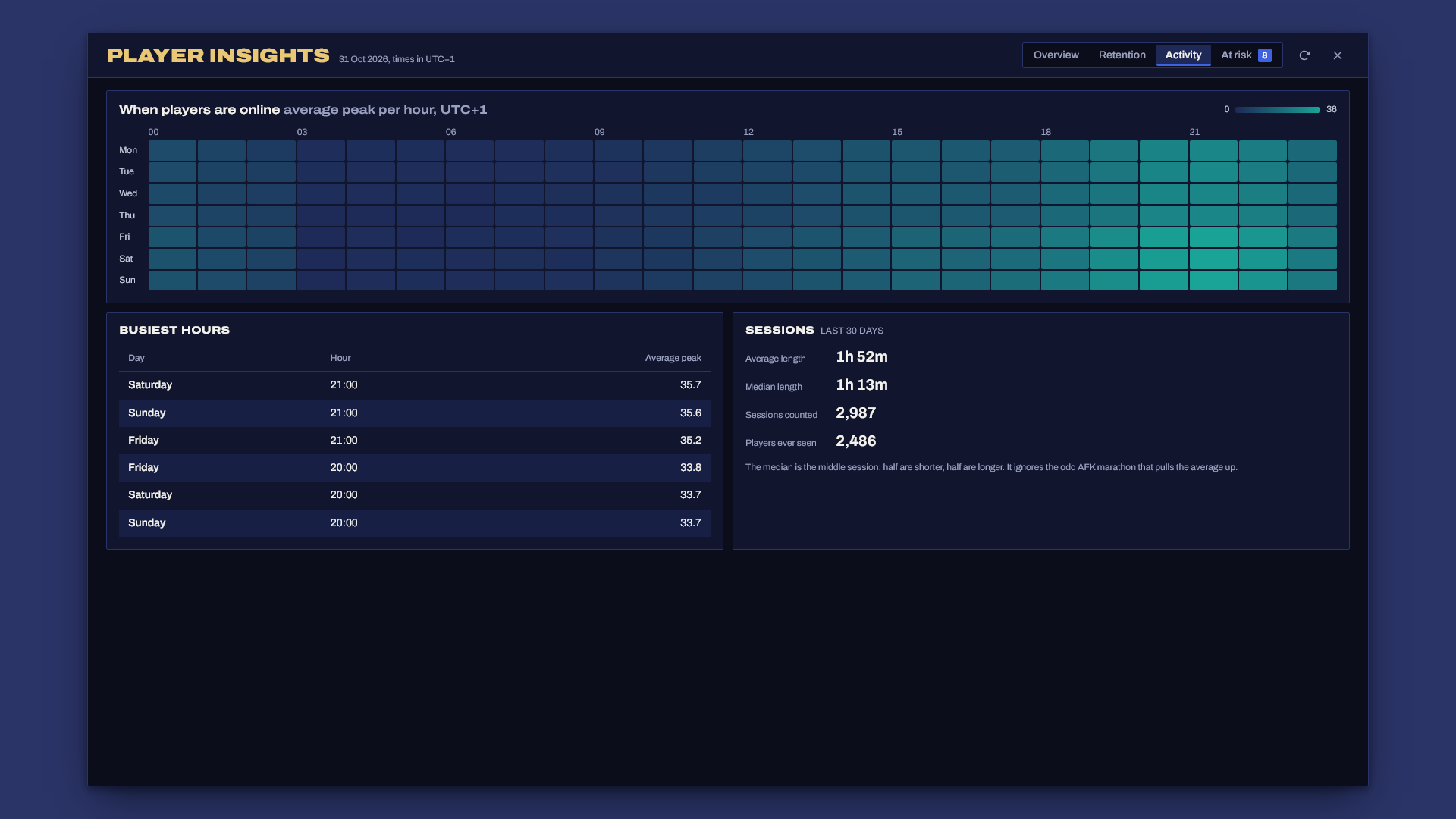
- Session length, average and median, plus a breakdown of total playtime per player.
- When players are online. A Monday to Sunday heatmap of the average peak for every hour, in your time zone, so you know when to run events and when to have staff on.
- Regulars at risk. Players with real history whose time away is far longer than their usual gap between visits. Someone who played every day and has been gone ten days shows up, and someone who drops in every two weeks does not.
- Why players leave. Disconnects grouped into quit, timed out, game crashed, kicked or banned, and server restart.
- Daily Discord summary (optional) with yesterday's players, new players, peak, playtime and how many of the day before's new players came back.
- Exports for welcome scripts and rewards: playtime, first seen and whether a player is new.
- Fast with a year of data. Raw sessions get rolled up into daily totals, so the dashboard never scans a year of sessions. Old raw sessions are deleted after 90 days (you choose).
Requirements
- oxmysql
- Any framework or none. ESX Legacy, Qbox and QBCore are detected on their own.
Install
- Unzip so that
resources/player_insights/fxmanifest.luaexists (notresources/player_insights-v1.0.0/player_insights/..., which Windows "Extract All" creates). - Add
ensure player_insightstoserver.cfg, afterensure oxmysql. Start order for your framework doesn't matter. Player Insights waits up to 30 seconds for one that is installed, and it starts tracking sessions straight away while it waits. - Give your staff the ACE (next section).
- Set your time zone in
config.lua(Config.Timezone). Days, the heatmap and cohorts all follow it. - Start the server. The tables create themselves.
- Staff open the dashboard with
/insights.
Numbers fill in as players come and go. Day 1 retention needs two days of data, and day 30 needs a month.
ACE
add_ace group.admin playerinsights.view allow

# People: their Rockstar license
add_principal identifier.license:1a2b3c4d5e6f7a8b9c0d1e2f3a4b5c6d7e8f9a0b group.admin
The server checks the ACE every time the dashboard opens or refreshes. Nothing on the dashboard can change data, so there's only one permission.
How it counts
- Players are counted by Rockstar license, so the numbers count people, and every character on one license is the same player. A player with no license (only possible on a server with
sv_lanor a broken launcher) isn't tracked, and the console says so once. - A session runs from join to leave. A player who comes back within 3 minutes (IE a crash and a quick reconnect) continues the same session. A player who reconnects before the old connection has timed out also keeps one session.
- Restarts. Open sessions are saved every 2 minutes. After a crash or restart they end at the last save, so you lose at most 2 minutes of playtime. Restarting only this resource keeps everyone's session running.
- Long sessions are split at midnight in your time zone, so a session from 23:00 to 02:00 counts one hour on the first day and two on the next. Days are 23 or 25 hours long when the clocks change, and they're counted that way. No session counts for more than 24 hours.
- The clock. If the host clock is set back, time holds until it catches up, so no session ever gets a negative length.
- Retention is rolling. Day 7 is the share of new players who played again 7 or more days after their first day. Cells only count players old enough to be judged, and a dot marks a cell where part of the week is still too new.
- Leaving reasons come from the reason text FiveM gives when a player drops. Anything it can't place goes into Other.
Config
The main settings, all in config.lua with comments:
Config.Timezone = { utcOffset = 0, dst = 'eu' }   -- 1 for Berlin, -5 with 'us' for New York, 'none' for no summer time
Config.Sessions = { resumeSeconds = 180, heartbeatSeconds = 120, maxHours = 24 }
Config.NewPlayer = { days = 3, hours = 5 }        -- what IsNewPlayer means
Config.RetentionDays = { 1, 7, 14, 30 }           -- cohort table columns
Config.Churn = { minVisits = 5, factor = 3, minGapDays = 4, maxGapDays = 45, limit = 25 }
Config.Storage = { keepSessionDays = 90, keepHourlyDays = 400, rollupMinutes = 10, cacheSeconds = 30 }
Discord summary
A summary of the day before gets posted once a day, shortly after midnight in your time zone. Put the webhook URL in server.cfg:
set player_insights_webhook "https://discord.com/api/webhooks/..."
Use set, not setr. A setr value is sent to every player, and anyone with the URL can post to your channel.
Exports
exports.player_insights:GetPlaytime(source)               -- seconds played in total, this session included
exports.player_insights:GetPlaytime('license:...')        -- the same for a license, online or not
exports.player_insights:GetFirstSeen(source)              -- Unix time of their first visit, or nil
exports.player_insights:IsNewPlayer(source)               -- true inside Config.NewPlayer's limits
A welcome message for new players:
AddEventHandler('playerJoining', function()
    local src = source
    SetTimeout(5000, function()
        if exports.player_insights:IsNewPlayer(src) then
            TriggerClientEvent('chat:addMessage', src, { args = { 'Welcome', 'First time here? Ask in /help.' } })
        end
    end)
end)
For a player who is offline, the exports read the database, so call them from a thread or an event handler.
Escrow
The core is encrypted with Cfx asset escrow. These stay open so you can adapt them: config.lua, server/bridge.lua (the optional framework code) and sql/install.sql.
Troubleshooting
Couldn't find resource player_insights: the folder is nested. Openresources/and check thatplayer_insights/fxmanifest.luasits directly inside it. Windows "Extract All" adds an extra folder named after the zip.- "You don't have access to Player Insights." The player doesn't have
playerinsights.view. Check theadd_aceandadd_principallines and that the license matches. Runtest_ace identifier.license:... playerinsights.viewin the server console to see what the server thinks. - Database setup failed in the console: oxmysql isn't connected, or your database user can't create tables. Fix the connection or run
sql/install.sqlby hand. - The heatmap or days look an hour off: set
Config.Timezoneto your community's time zone, with the right summer time rule. - Retention shows dashes: nobody in that week is old enough yet. Day 7 needs players who joined at least 7 days ago.
- The webhook posts nothing: the console prints a warning when
player_insights_webhookis set but isn't a Discord webhook URL. Also, the summary only goes out once a day, shortly after midnight. - No character names in the at-risk list: they only show when ESX, Qbox or QBCore is running and the player loaded a character during a visit.
Support
Open a ticket in the Discord with your framework (or none), your oxmysql version and the server console output from startup.