Job Demand
Version 1.0.0. The listing, or pick it up in the shop and run it.
Job Demand
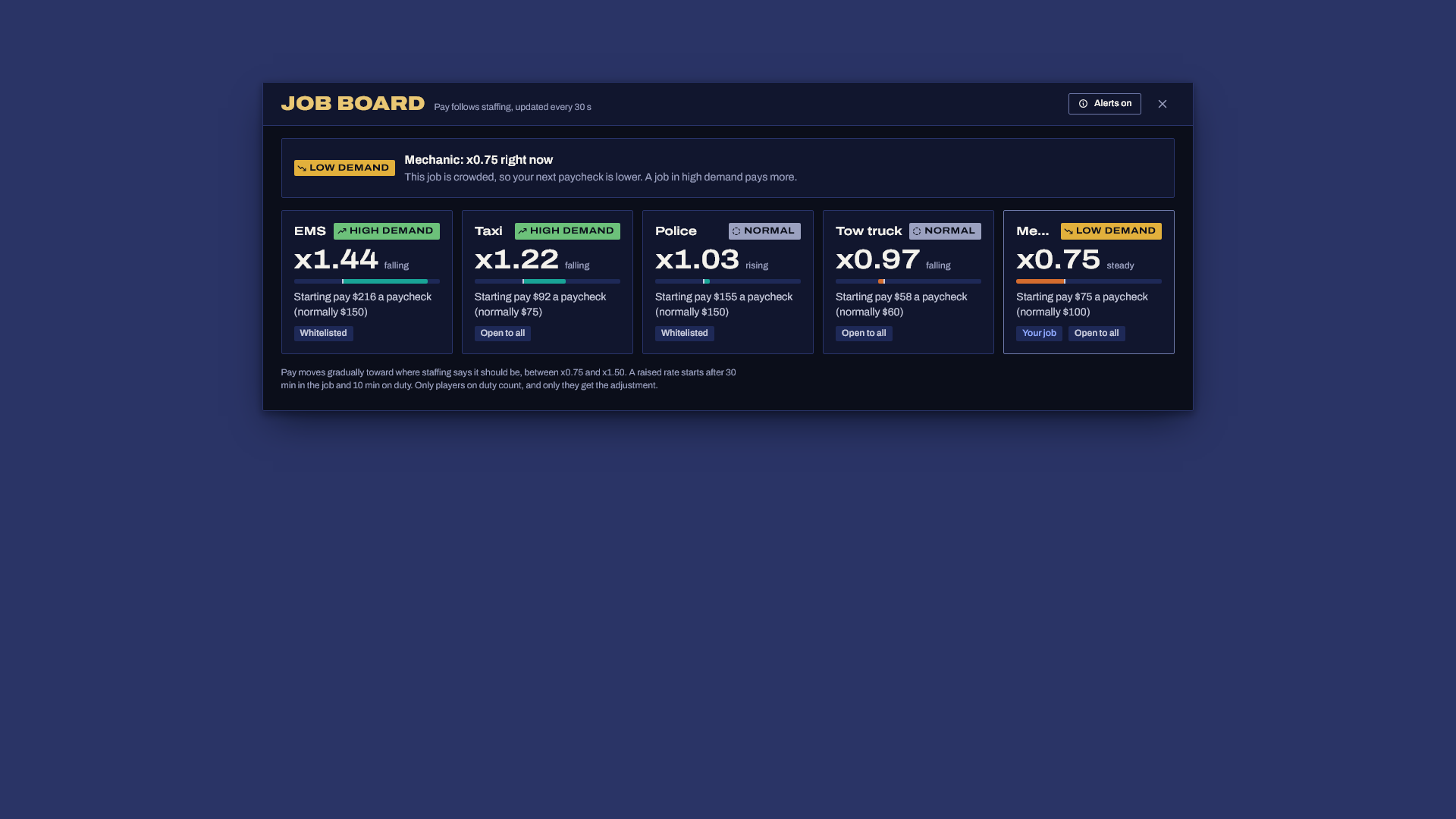
Job Demand makes paychecks follow staffing. When fourteen people are mechanics and nobody is on EMS, EMS pay goes up and mechanic pay goes down, inside limits you set. Players see it on a job board and spread out on their own, so staff don't have to ask anyone to switch jobs.
What you get
- Pay that follows headcount. Each tracked job has a target, either a share of the players online (IE 10% EMS) or a count at a reference player count. The further a job is from its target, the further its multiplier moves, between your minimum and maximum.
- Gradual changes. The multiplier moves part of the way every 30 seconds with a half-life you choose (20 minutes by default), so one login or one shift change never makes pay jump.
- Small server safety. Under a minimum player count every job pays x1.00. Above it the swing grows with the player count and hits full size from 32 players (both configurable), so three players online can't send pay to the limits.
- A job board (
/jobs) with every tracked job, its demand (high, normal, low), its multiplier, which way it's heading and what someone starting there would earn per paycheck. Players also see how their own job is doing and when a raised rate starts for them. - High demand alerts for players who are unemployed or in a crowded job, when an open job (taxi, tow, mechanic) runs short. Players can turn them off on the board.
- An admin view (
/jobdemand, ace protected) with headcount and target per hour, the multiplier history per job, and total payroll against what flat pay would have cost, so you see exactly how much money the system added to or kept out of your economy. - Anti abuse built in. Job hopping, duty toggling, other scripts reusing the paycheck reason, players with jobs you don't track and client events are all handled (see Security).
- History rolled up per hour in its own tables, created automatically and kept for 90 days.
- Exports for HUDs, phones and job scripts:
GetMultiplier,GetDemandandGetPlayerMultiplier. - ESX Legacy, Qbox and QBCore, detected automatically.
How it changes pay, per framework
None of the three frameworks lets another resource change the salary amount before it's paid, so Job Demand leaves the framework paycheck exactly as it is and pays the difference straight after it: a bonus when the job is short of people, a cut when it's crowded. Your paycheck interval, grades, society payouts, off duty rules and the framework's own "you received your paycheck" message all stay as they are. Nothing in your framework config needs to change, and removing Job Demand puts pay back to normal at once.
Every line below was checked against the framework's current source, and server/bridge.lua lists the file and line for each call.
| Framework | How it pays salaries | What Job Demand listens to |
|---|---|---|
| ESX Legacy | server/modules/paycheck.lua loops every Config.PaycheckInterval and pays grade_salary with addAccountMoney('bank', salary, 'Paycheck'). No hook of its own. |
The server event esx:addAccountMoney with reason Paycheck on the bank account. Unemployed players get reason Welfare Check and are never adjusted. |
| QBCore | PaycheckInterval() in server/functions.lua every PayCheckTimeOut minutes, paying with AddMoney('bank', payment, 'paycheck'). No hook and no switch to turn it off. |
The server event QBCore:Server:OnMoneyChange with action add, reason paycheck, account bank. |
| Qbox | server/loops.lua every paycheckTimeout minutes calls sendPaycheck in qbx_core/config/server.lua. |
The hook that sendPaycheck fires, qbx_core:server:onPaycheck. If you edited sendPaycheck, keep that event in it. |
The adjustment goes to the same bank account with its own reason (job demand bonus or job demand adjustment), so Economy Pulse and other money logs can classify it. A cut can only ever take part of the paycheck that was just paid.
On society payouts (ESX EnableSocietyPayouts, QBCore PayCheckSociety, Qbox paycheckSociety) the framework still pays the base salary from the society. The bonus is new money and a cut is removed money, and neither one touches the society account. The admin view shows the total either way.
Duty. QBCore and Qbox have onduty on every job. Current ESX Legacy has job.onDuty too (on by default when a job is set, Config.DefaultJobDuty in es_extended), and older ESX without it counts everyone as on duty. With Config.OnDutyOnly on (the default), only players on duty count toward headcount and only they get an adjustment. Off duty players get exactly what the framework pays.
Requirements
- ESX Legacy, Qbox or QBCore
- oxmysql
- MySQL 5.7+ or MariaDB 10.2+
Install
- Unzip so that
resources/job_demand/fxmanifest.luaexists (notresources/job_demand-v1.0.0/job_demand/..., which Windows "Extract All" creates), then addensure job_demand. Start order doesn't matter, it waits up to 30 seconds for your framework and prints what it found, for exampleadjusting paychecks on qbcore for 4 job(s): police, ambulance, mechanic, taxi. - Give staff access to the admin view in
server.cfg:add_ace group.admin jobdemand.admin allow - Edit
Config.Jobsinconfig.luato list the jobs you want to balance, with your own job names. - Start the server. The tables create themselves on every start, so there is no SQL to import.
- Players open the board with
/jobs. Staff open the admin view with/jobdemand. Typingjobsorjobdemandin the server console prints a summary.
Give it an hour before you read anything into the charts, they need two hours of samples to draw a line.
Configure
Everything is in config.lua, with comments.
Config.Jobs: the jobs that follow demand.share = 0.10wants one in ten online players in the job.count = 4wants four whenConfig.ReferencePlayers(48) are online and scales with the player count.minCountkeeps a floor for jobs you always want covered.open = truemarks jobs anyone can take, and those are the only ones that send high demand alerts.minandmaxset limits for one job. Every other job gets paid exactly what the framework pays.Config.ExcludedJobs: never tracked or adjusted (unemployed, staff). They still count as online players, because they're who the board is trying to attract. TurnCountExcludedInPopulationoff to leave them out.Config.Multiplier:MinandMaxare the limits (0.75 and 1.50).Sensitivityis how hard pay reacts. With 0.5, an empty job heads for x1.50 and a job at twice its target heads for x0.50, before the limits. SetMin = 1.0if you only want bonuses and never want to cut anyone's pay.Config.Smoothing.HalfLifeMinutes: after this long, the multiplier has covered half the distance to where staffing says it should be.Config.Population: no swing underMinPlayers, full swing fromFullEffectAt. In between, the swing grows with the player count (16 players with the defaults is half size).Config.Levels: where the board says high and low demand.Config.OnDutyOnlyandConfig.Tenure: see Security.Config.Paycheck: the account, the paycheck reason per framework (only change it if your core uses another one), the reasons written on the adjustment and whether players get a message about it.Config.Board.ShowHeadcount: off by default. On a lot of servers, a menu that tells anyone how many police are on duty is information criminals shouldn't have. Staff always see headcount in the admin view.
Exports
-- Current multiplier for a job. 1.0 for jobs that aren't tracked.
local m = exports.job_demand:GetMultiplier('ambulance')        -- 1.24

-- Every tracked job, highest multiplier first:
-- { name, label, multiplier, heading, level, open, entryPay, pay, headcount, target }
local jobs = exports.job_demand:GetDemand()

-- What this player's next paycheck is multiplied by, after the job hopping guard.
-- Handy for job scripts that pay per task and want to follow demand too.
local mine = exports.job_demand:GetPlayerMultiplier(source)
Security
- Job hopping before payday. A raised rate only applies after a character has held the job for
Config.Tenure.MinJobMinutes(30) and, withOnDutyOnly, been on duty forMinDutyMinutes(10) without a break. Until then they get the normal framework paycheck and the board tells them how long is left. A lowered rate applies straight away, so hopping never dodges a cut. Time in a job is stored per character, so it survives relogs and restarts. - Duty toggling. Every duty change restarts the duty clock, so toggling right before payday gets base pay. Going off duty as a group to push the rate up barely moves it, because the multiplier is smoothed over many minutes and the raised rate then waits for the duty clock anyway. Duty events are rate limited per player.
- Other scripts reusing the paycheck reason. Only one adjustment per character every
Config.Paycheck.MinSecondsBetweenseconds (120). The framework pays every 7 to 10 minutes, so real paychecks are never skipped. Paychecks aboveMaxAmountare left alone. - Jobs you don't track (and excluded jobs) get no adjustment and an export multiplier of 1.0.
- Client events. Job changes, duty changes and paychecks are never taken from a client. The framework events are listened to with
AddEventHandleronly, never as network events, so a modified client callingTriggerServerEvent('QBCore:Server:OnMoneyChange', ...)oresx:setJobreaches nothing here. Even those server events are only used as a cue, and the job and duty state are read again from the framework's player object. The two network events this resource has (board refresh and admin refresh) are rate limited, and the admin one checks the ace on every request.
Troubleshooting
- Nothing happens on start, or "couldn't find fxmanifest.lua": the folder is nested one level too deep. You need
resources/job_demand/fxmanifest.lua. No framework finished starting within 30s: the message lists what it saw. Make sure your core is started, or setConfig.Framework.Config.Jobs lists "x" but qbcore has no such job: a typo, or a job name that's different on your server. Use the job's name, not its label.- Pay never changes: check the console summary (
jobdemandin the server console). UnderConfig.Population.MinPlayersonline, every job stays at x1.00 on purpose. WithOnDutyOnly, players who are off duty don't count. - Players get no bonus right after joining a job: that's the job hopping guard. The board shows how long is left.
- No adjustments at all on Qbox: your
sendPaycheckinqbx_core/config/server.luano longer firesqbx_core:server:onPaycheck. Put theTriggerEventline back. - No adjustments on ESX or QBCore: another resource replaced the framework paycheck and pays with a different reason. Add that reason to
Config.Paycheck.Reasons. Database setup failed: oxmysql isn't connected or the database user can't create tables.
Escrow
The core is encrypted with Cfx asset escrow. These stay open so you can adapt them: config.lua, locales/, server/bridge.lua (all the framework code lives there, so edit it if your core is forked) and sql/install.sql.
Support
Open a ticket in the Discord with your framework, oxmysql version and the server console output from startup.